
Download OnceWrote
Pick your device. It takes about two minutes.
OnceWrote is in early testing. Ask for early access and we send you the link by email.
For Windows and Android. Not on iPhone or Mac yet.
OnceWrote for Windows
Works on: 64-bit Windows 10 and Windows 11. The file is about 118 MB.
Cost: free to start, with some limits. Full access removes them. See Pricing.
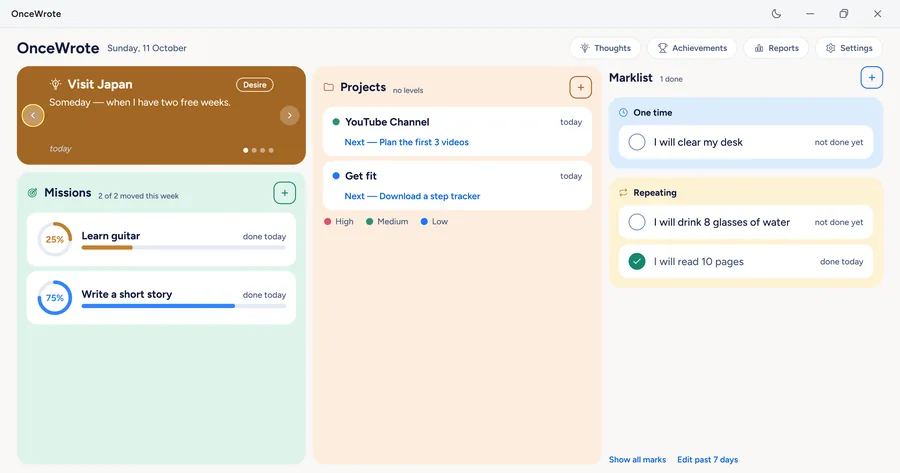
How to install:
- Click the download link we emailed you. Wait for the file to finish.
- Your browser may say the file "isn't commonly downloaded". This is normal for a new app. Click Keep (in Edge, open the three dots first, then click Keep, then Keep anyway).
- Open the file you downloaded.
- If Windows shows a blue box saying "Windows protected your PC", click More info. Then click Run anyway.
- Leave the choices as they are. Click Next, then Install, then Finish. OnceWrote opens.
Why do the warnings show up? Browsers and Windows show these messages for apps from small makers that they have not seen many times before. They do not mean the app is a virus. OnceWrote does not read your files and does not track you.
Good to know on Windows:
- OnceWrote lives in the tray, by your clock. Closing the window hides it there. To quit fully, right-click the tray icon and click Quit.
- To update, download the new file and run it. Your writing stays.
- To remove it, use Windows Settings → Apps → OnceWrote → Uninstall. Your writing is left on your computer in case you install again. To remove it too, tap Delete everything inside the app first.
OnceWrote for Android
Works on: Android 8 or newer. The file is about 55 MB.
Cost: free to start, with some limits. Full access removes them. See Pricing.
This is a direct download (an APK file), not from an app store. So Android asks a few safety questions. They are normal.
How to install:
- On your phone, tap the download link we emailed you. Wait for the file to finish. If your browser says this type of file can harm your device, tap Download anyway (or OK).
- Open the file you downloaded. You can find it in your browser's downloads or in the Files app.
- Android may say it cannot install apps from this source. Tap Settings and turn on Allow from this source. Then press Back.
- Tap Install.
- If Google Play Protect shows a message such as "App blocked" or "Unrecognised app", tap More details, then Install anyway. The words are a little different on each phone.
- Tap Open.
After installing, you can turn Allow from this source off again in Settings.
Why do the warnings show up? Play Protect knows apps from the Play Store best. OnceWrote is a small app that you download straight from us, so Google has not seen it many times before. This does not mean it is a virus. OnceWrote does not read your files and does not track you.
If you remove the app from your phone, the writing on the phone is removed too. If you were signed in, your writing is still safe in your account.
Your first minute
| Screen | What you do |
|---|---|
| Welcome | Tap Continue with Google to keep your writing in your account. Or tap the small Not now link to use it on this device only. |
| Set a password | Everyone sets a password, even without Google. It locks your writing. Type it twice. You will see 12 recovery words. Write them on paper. Tick I've written them down. |
| Your board | You land on your board with a few examples. Look around. Remove the examples any time with Clear example data in Settings. |
| Reminder | The end-of-day reminder is on, at 9:30 PM. On Android, the phone asks permission once. You can say no, or turn it off in Settings. |
| Lock (optional) | In Settings, turn on Lock with a PIN if you want one. |
Important: Nobody can reset your password. If you lose both your password and your 12 words, nobody can bring your saved writing back. Keep the words somewhere safe.
Not available yet
OnceWrote is not on iPhone, Mac or the web yet.